Lovely Bunny Floral Clipart: Integrating a Cute Asset Collection into Creative Workflows
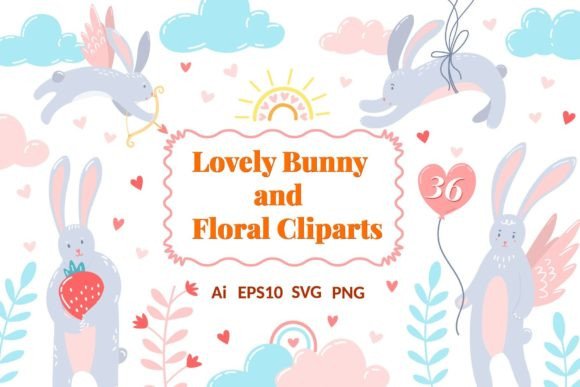
For many creators, the journey from a blank canvas to a finished project begins not with a brushstroke or a line of code, but with the selection of a foundational asset. Lovely Bunny Floral Clipart represents such a starting point. This collection is a cohesive set of digital images featuring romantic rabbit illustrations intertwined with delicate floral elements like blossoms, leaves, and vines. Its core value lies in providing a ready-made aesthetic of whimsy and tenderness, eliminating the need to source or draw these motifs individually.
Understanding the Collection's Structure and Formats
Before integrating any asset into a process, understanding its technical composition is crucial for seamless use. The Lovely Bunny Floral Cliparts Collection is delivered as a multi-format package designed for compatibility across different software and stages of a project. You receive two master AI and EPS10 files, ideal for professional vector editing in Adobe Illustrator or similar applications. These allow for infinite scaling and unified color adjustments. The collection is also broken down into 36 individual PNG and SVG files. The PNGs, at 300 dpi and 1000x1000 pixels, are ready for raster-based designs, web use, or direct printing. The matching SVGs preserve vector quality for software that supports it, like Canva or Affinity Designer.
This format variety is a deliberate workflow consideration. A graphic designer might start in Illustrator with the AI file to create a complex composite illustration, then export specific elements as PNGs for a client's web banner. A hobbyist making stickers might work directly with the individual PNGs in a simpler program like Photoshop or even a mobile app. By providing both aggregated and disaggregated files, the collection supports both top-down and bottom-up creative approaches.
Strategic Use in Project Planning and Ideation
The utility of Lovely Bunny Floral Clipart begins in the planning phase. When conceptualizing a spring marketing campaign, a birthday card series, or a nursery decoration theme, these cliparts can serve as visual anchors. A small business owner planning seasonal product labels can review the bunny and floral elements to quickly establish a consistent visual language. This early adoption prevents aesthetic drift later in the project.
Consider a blogger outlining a series of posts about gardening or home crafts. By selecting a few key cliparts during the outline stage, they can ensure all accompanying graphics share a harmonious style, strengthening the series' brand identity. This pre-visualization saves time searching for disparate images during the hectic execution phase. The collection acts as a pre-curated visual library, reducing decision fatigue and accelerating the move from idea to draft.
Integration into Active Creation and Production
During the active execution of a project, the cliparts become functional components. Their integration often involves layering, combining, and modifying. For digital design, the SVG and AI files allow creators to change colors to match a brand palette, separate elements to rearrange compositions, or scale bunnies and flowers independently without quality loss. This flexibility is key for maintaining efficiency when client feedback requests a color change or a layout adjustment.
In physical applications like scrapbooking or handmade card making, the high-resolution PNGs are crucial. Users can print the elements at a precise size for their layout, cut them out, and layer them with physical materials. The workflow here is hybrid: digital asset preparation followed by hands-on assembly. For sticker making, whether digital for social media or physical for sale, the clean, transparent-background PNGs are ready for immediate use in cutting software or for upload to print-on-demand platforms.
Maintaining Consistency Across Multiple Outputs
A significant challenge in repetitive creative work, like creating a monthly newsletter or a line of products, is visual consistency. The Lovely Bunny Floral Cliparts Collection, by virtue of being a set with a unified style, inherently addresses this. A marketer can use a floral wreath from the set on a Facebook post, a bunny holding a flower on the newsletter header, and a scattered floral element on a promotional PDF, all while maintaining a recognizable brand aesthetic. This repeated, varied use of assets from the same core collection builds a stronger visual identity than using entirely unique images for each output.
Organization of the assets supports this consistency. Storing the 36 individual files in a clearly named folder (e.g., "Bunny Clipart_Elements") within a broader "Brand Assets" directory makes them easily accessible for any team member or for future projects. This systematic storage turns the collection from a one-time download into a long-term resource.
Post-Project Applications and Long-Term Asset Management
The lifecycle of these cliparts often extends beyond a single project. A well-organized creator will archive the master files after use. Because they are vector-based in origin (AI, EPS, SVG), they remain future-proof. Two years later, when a new project requires a similar aesthetic, the user can revisit the files, perhaps extracting only the floral elements for a more botanical-focused design, demonstrating the collection's adaptable longevity.
For entrepreneurs and small business owners, this long-term view is part of a sensible resource strategy. Purchasing a versatile, high-quality clipart set is an investment that amortizes its cost over multiple applications—website décor, product packaging, social media graphics, and even internal document branding. The key to realizing this value is integrating the files into a central digital asset management system, tagged appropriately so they are discoverable when the need arises again.
Practical Considerations for Quality and Compatibility
Successful implementation requires attention to technical details. The 300 dpi resolution of the PNGs is optimal for print; using them for large-format printing requires checking that the 1000px size meets the physical dimensions needed. For purely digital use, the resolution is more than sufficient. The SVG format's compatibility should be verified with the intended software; most modern design platforms support it, but some older or specialized printing software may require conversion to PNG, which is a straightforward process.
A practical workflow tip is to begin any project that uses these assets by identifying the primary output format. If the final product is a printed brochure, working initially with the AI/EPS files in a vector program ensures the highest final print quality. If the output is a quick digital social media post, starting with the individual PNGs in a faster, web-based design tool may be more efficient. This destination-first thinking ensures the right file format is used from the start, avoiding unnecessary conversion steps later.
Conclusion: A Tool for Streamlined Creativity
Ultimately, the Lovely Bunny Floral Clipart collection is more than just a bundle of cute pictures. It is a workflow tool that can standardize aesthetics, expedite the early visual stages of a project, and provide a flexible resource for both digital and physical creations. Its multi-format structure caters to different professional and hobbyist applications, from advanced vector editing to simple drag-and-drop design. By understanding its components and thoughtfully integrating it into planning, execution, and asset management routines, creators can harness its romantic, whimsical style to add consistent beauty and cuteness to their work, not just once, but as a reusable element in their ongoing creative process.