The Simple Orange Floral Wreath: A Versatile Illustrator's Secret
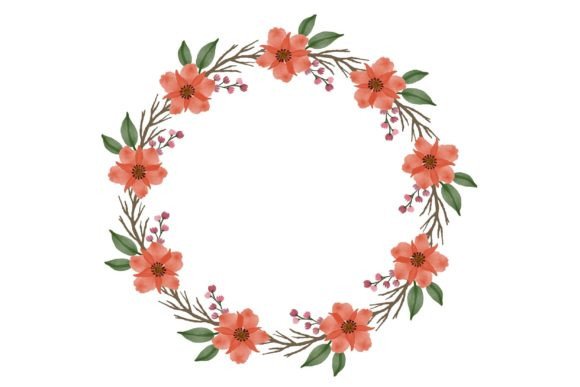
In a world saturated with complex digital assets, the clean elegance of a Simple Orange Floral Wreath can be a breath of fresh air. This particular watercolor floral illustration isn't just a pretty picture; it's a flexible design tool crafted for real-world use. At its core, it’s a vector-based artwork available in multiple file formats, designed to scale flawlessly from a business card to a fabric print. Yet, its apparent simplicity is where both its power and the potential for common user mistakes lie. Many creators rush to download such assets without considering how their choices around format, application, and intent directly impact the final result, turning a potential design triumph into a frustrating ordeal.
Overlooking the Vector Foundation
A fundamental misunderstanding occurs when users treat the Simple Orange Floral Wreath merely as a static image. The included .EPS 10 file is a vector graphic, meaning it’s built from mathematical paths rather than fixed pixels. This is its greatest strength. A common mistake is to default to using the JPG or PNG for every project because they feel more familiar. While that’s fine for a quick web graphic, using a raster format (like JPG) for print or large-scale applications leads to pixelation, blurry edges, and an overall loss of quality. Imagine printing that beautiful wreath on a large mug only to see fuzzy, distorted lines—the professional presentation you intended is instantly compromised.
The corrective approach is simple: match the format to the project’s scale. Use the .EPS file for any physical product (like fabric, mugs, or large invitations), for professional print work, or whenever you need to resize the artwork dramatically. The vector file ensures crisp lines at any size. Reserve the high-resolution PNG (with its transparent background) for digital designs like web wallpapers or card mock-ups where you need layering, and the JPG for simpler, fast placements where transparency isn’t required. Checking the file format before you start is the single most important step to preserving quality.
Misjudging Color and Style Context
Another oversight is applying the illustration without considering its aesthetic context. The watercolor style with its soft orange palette evokes warmth, approachability, and a touch of rustic charm. A mistake often made by entrepreneurs and marketers is forcing this specific style into a brand context that doesn’t align. For instance, using this wreath as a primary logo element for a high-tech, minimalist fintech startup would likely create visual dissonance and confuse communication with customers. The style speaks before the content does.
A better method is to evaluate your project’s tone first. The Simple Orange Floral Wreath excels in projects aiming for warmth and creativity: wedding invitations, artisanal product labels, cozy blog headers, educational materials for nature topics, or hospitality branding. Before committing, ask: “Does this watercolor aesthetic support my message?” If yes, it can elevate your design. If not, you might need a more geometric or abstract asset. This isn’t a limitation of the wreath, but a smart application of design principles.
Negating the Power of Customization
Many users, especially beginners, treat pre-made illustrations as finished, untouchable elements. They plop the wreath onto a design and leave it as-is. This ignores a key advantage of owning a vector file: the ability to customize. Perhaps you only need a segment of the wreath for a sidebar decoration, or you want to isolate a single flower for a repeating pattern on a tee. The mistake is seeing the asset as a monolithic block.
Practical advice: open the .EPS file in a vector program like Adobe Illustrator, Inkscape, or even Affinity Designer. Explore. You can often ungroup elements, change colors (though the orange palette is lovely), or recompose parts. This transforms a single-use asset into a toolkit. For example, a small business owner could use the full wreath on an invitation, then use deconstructed floral elements for coordinating thank-you cards and packaging stickers, creating a cohesive brand suite from one download. This approach maximizes efficiency and value.
Failing to Plan for Multi-Format Use
The package typically includes three formats: .EPS, .JPG, and .PNG. A common, costly error is downloading similar illustrations repeatedly for different projects because you didn’t realize one asset could serve all. A blogger might download a wreath for a header, then later buy a separate “wallpaper” graphic, then another for “card” elements, incurring unnecessary cost and creating a disjointed visual library.
The solution is to approach the Simple Orange Floral Wreath with a strategic mindset. From the start, recognize its included formats allow it to function as:
- A scalable print-ready design (.EPS for mugs, fabric, large posters).
- A digital graphic with transparency (.PNG for overlays on web banners, card mock-ups).
- A simple embedded image (.JPG for quick placements in documents or basic web graphics).
Before purchasing any digital asset, check what formats are included. A quality bundle like this one means you invest once for a multitude of applications, saving money and ensuring visual consistency across your entire range of materials—from your website wallpaper to your market stall tee.
Underestimating Technical Preparation
Finally, a practical mistake happens at the very start: not having the right software to utilize the asset fully. Downloading an .EPS file without access to a program that can edit vectors leaves you stuck with only the raster versions. This limits your ability to customize or prepare the artwork for professional printing. Many hobbyists and freelancers encounter this hurdle.
To avoid this, assess your toolkit before you buy. If you lack a vector editor, consider if the PNG and JPG alone will suffice for your current needs. If you foresee needing scalable edits, explore free or affordable vector software. This small piece of preparation ensures you can unlock the full potential of the illustration, rather than feeling frustrated by a file you can’t open. Remember, the Simple Orange Floral Wreath is a tool; having the right software is like having the right key.
Making Your Decision: A Constructive Checklist
To ensure this watercolor floral illustration becomes a helpful asset rather than a digital dead-end, run through a quick mental checklist before and after downloading.
First, align style and purpose. Does its warm, organic watercolor feel match your project’s vibe? Second, identify your primary format need. Are you printing physically or working digitally? Third, consider customization. Do you have the skills or software to modify it if needed? Fourth, plan for future use. Could this same asset serve other projects in your pipeline, saving you future searches?
By taking these moments to evaluate, you move from being a passive consumer of graphics to an active, strategic designer. The Simple Orange Floral Wreath, with its gentle blooms and versatile file set, is more than decoration. It’s a design resource that, when chosen and applied thoughtfully, can add consistent, scalable beauty to your creative and professional work for years to come.